I prefer a qwerty keyboard for programming, but to write in my native language (Dutch) I need sometimes accented characters like ë, ï, é, etc, which do not have dedicated keys on a qwerty layout.
A handy way under Linux is to use a "compose key" ([Alt Gr] on my setup), which allows you to compose accented characters by entering the accent (umlaut, accent grave, ...) and the unaccented character separately.
Some examples (I don't use all these cases myself, it's just an illustration of what is possible):
| to enter | I type |
| é | [Alt Gr] ['] [e] |
| è | [Alt Gr] [`] [e] |
| ü | [Alt Gr] ["] [u] |
| ô | [Alt Gr] [^] [o] |
| ç | [Alt Gr] [,] [c] |
| ñ | [Alt Gr] [~] [n] |
| å | [Alt Gr] [o] [a] |
| æ | [Alt Gr] [a] [e] |
| Œ | [Alt Gr] [O] [E] |
| ø | [Alt Gr] [/] [o] |
| ß | [Alt Gr] [s] [s] |
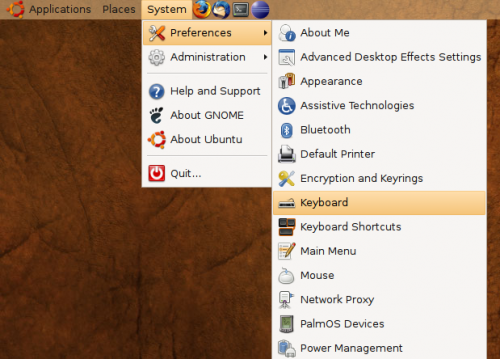
To enable this feature under Ubuntu Linux 8.04 (Gnome desktop) go to the keyboard preferences (Ubuntu menu > "Settings" > "Preferences" > "Keyboard").
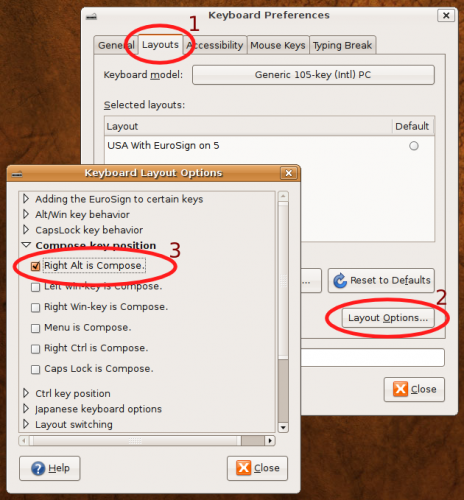
Then, go to the tab "Layouts" and press the "Layout Options..." key at the bottom. Under "Compose key position" you can enable the compose key of your liking (which is [Alt Gr] aka "Right Alt" for me).
This is for Ubuntu 8.04, but other flavors of Linux or other window managers probably have very similar ways to configure the compose key.
Any other ways?
I understand that this post is a bit old, but it shows how to do exactly what I want. Almost.
The problem is that I'm using Xbuntu, which does not have a have a "Layout Options" in the Keyboard preferences. Do you (or anyone) have any idea how to assign accented keys from the command line?
Many thanks!
But how to accent russian
But how to accent russian characters, like ? but with an accent on it? (like the one in ?).
You never need accent chars
You never need accent chars in Russian because every Russian letter is assigned its own key.
Thanks - I needed italian
Thanks - I needed italian accents! :-)
Great.
You saved my life man. This laptop is American and sometimes I need to write in Spanish. This will help me with special characters.
Thanks a lot for the tip, i
Thanks a lot for the tip, i need this characthers for my native language too, but im pretty new to linux i was a little confused but you clear my mind.
juego de poker
qwerty layout
Hello,
Thanks a lot!
I write emails on a daily basis in Spanish, French and English, and what I was doing was changing the layouts every 10 minutes.
Now I only have to change to Russian :D
special characters with qwerty and ubuntu
Dag Stefaan,
Thanks a lot for this explanation.....Clear short and accurate.
I have been struggling for a couple of hours on the net to find the solution....and the ubuntu forum is chinese sounds a bit chinese for me as I am not an IT specialist.
Veel bedankt nog eenmaal
Sal
Post new comment