LaTeX: inline BibTeX entries with the bibentry package

17 July, 2009 - 11:28

In the introduction chapter of my PhD dissertation, I had to make a listing of my publications. The obvious brain dead way to achieve this is just typing everything manually in a list. But this feels just so wrong when you're already using BibTeX for managing references and bibliographical stuff. However, the traditional usage of BibTeX in LaTeX is to generate a full list of all references and put this in a dedicated section or chapter.

With the bibentry package (which is part of the natlib package actually) it is possible to put bibliographic entries anywhere in the text. As far as I know and experienced, the bibentry package is included in a default LaTeX setup, so you don't have to install something, just enable it in your document.

Getting it work as desired can take some trial and error, so I thought it may be a good idea to feed "them search engines" with a working example.

Here is a simple proof of concept example LaTeX document test_bibentry.tex:

\documentclass{article}
 
\usepackage{bibentry}
\nobibliography*
 
\begin{document}
 
\section{Introduction}
 
Look ma, inline bibtex entries:
 
\begin{itemize}
\item \bibentry{michael}
\item \bibentry{elvis}
\end{itemize}
 
\section{And now for something completely different}
Lorem ipsum yada yada,
also see \cite{britney}, 
yada yada, and \cite{marilyn} too.
 
\bibliographystyle{alpha}
\bibliography{test_bibentry.bib}
 
\end{document}

The stuff that's important here:

  • \usepackage{bibentry}: duh.
  • \nobibliography*: tells bibentry to (re)use the bibliographic data from the standard BibTeX setup by \bibliography{test_bibentry.bib}.
  • \bibentry{foo}: an inline bibliographic entry will be put here.

Here is the accompanying BibTeX file test_bibentry.bib:

@Book{michael,
    author = "Michael Jackson",
    title = "My Kingdom For A Lollypop",
    publisher = "Neverland \& Everland Publishing",
    year = 2004
}
 
@Book{elvis,
    author = "Elvis Presley",
    title = "Turn Me One More Time",
    publisher = "Jail House Books",
    year = 1963
}
 
@Book{britney,
    author = "Britney Spears",
    title = "Let's Go Oversea To Canada",
    publisher = "Blonde, Blondt \& Blondey",
    year = 2007
}
 
@Book{marilyn,
    author = "Marilyn Manson",
    title = "I Love My Little Pony",
    publisher = "Pinc \& Cuddley Press",
    year = 2005
}

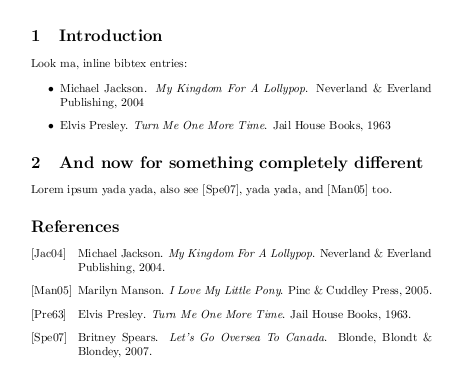
And here is what it looks like in the end:
bibentry result example

Note the inline entries in the introduction section, the standard \cite{} references in the second section and how all references show up in the final bibliographic listing. Just how I wanted it in my PhD dissertation. With slightly different content of course.

4 May, 2012 - 13:25

This makes my life easier.

Dale zhang (not verified)

This makes my life easier. Thanks.

17 February, 2012 - 17:53

Thanks and questions

Raff (not verified)

Hello!

First of all, thank you for this article; I have spent days and nights looking for a way to divide my bibliography in sections without handtyping all the references, and this solution works almost perfectly.

I only have two relatively issues. First thing is the indentation: I have used itemization environments associated with bibentries to create different sections, but some entries are longer than a line, and I would like the second line to be indented - how could I get the itemize environment? For the moment I have, in my .tex,
\begin{itemize}
\item[] \bibitem{key}
...
\end{itemize}
Which results in all the items and all the lines being on the same vertical line on the left side of the sheet (if that's clear enough...) and I would like only the first lines (i.e. the authors names) to be on the same vertical line.

Other problem: I have multiple entries by the same author; in the general, non-section-divided bibliography that I had first created, all were sorted alphabetically, and dashes appeared in place of the second and sometimes third occurrences of an author's name. Now, in the item/bibentries lists, I find dashes BEFORE an author's name is quoted, which is not at all what I want... Any clue on how to solve this?

Thanks once again for the article!

15 February, 2012 - 08:04

thanks!!

GeekGirl (not verified)

thanks so much!! you're my saviour!! been trying different things e.g bibunit or was gonna try to use bibitem.
your solution is elegant and simple. my thesis is due tomorrow... so that really helps :)

22 November, 2011 - 17:15

Thanks

Anonymous (not verified)

Thanks a lot! This is exactly what I was looking for.

Cheers

23 October, 2011 - 21:37

Thanks!

Anonymous (not verified)

Thank you so much for this page. I really needed that last tip in the comments (to remove the references section when hyperref is present). Worked perfect. Livesaver.

27 September, 2011 - 10:05

Only title, only authorlist?

Gerrit Holl (not verified)

Excellent! Question: do you know a way to get only the title, or only the author-list, or fine-tuning the layout? As it is formatted by bibtex; not as \citeauthor* does giving only the last names, but the authorlist as it would appear with \bibentry or in the bibliography. The same for the title. For our theses, we have a specific formatted page for included papers, and there is some \vspace between the authorlist and the title. Any idea how to do this?

3 July, 2011 - 20:32

What Florian said... Thanks

Anonymous (not verified)

What Florian said... Thanks for posting this.

1 April, 2011 - 16:50

Same here

Florian (not verified)

Was looking for exactly that. Thanks for taking the time to write it up!

13 November, 2010 - 16:48

Finally found this page... oh

Anonymous (not verified)

Finally found this page... oh so many thanks!

2 September, 2010 - 08:41

Finally

bee (not verified)

I googled "latex bibliothek inline" and found this page which solves my problem that I had. Tried with multibib, biblatex, all to no avail. This is brilliant and easy, thanks!

But yeah, the last two commands are not necessary:

\bibliographystyle{alpha}
\bibliography{test_bibentry.bib}

Gruss
bee

Post new comment

The content of this field is kept private and will not be shown publicly.
  • No HTML tags allowed
  • Lines and paragraphs break automatically.

More information about formatting options